

How I deployed a Next.js app to an Azure App Service
Here's the step-by-step process of deploying a Next.js application to Azure App Service, covering initial setup, configuration, and resolving issues I encountered during the process.
Deploying the this website to Azure App Service was a relatively straightforward process I still ran in to some few issues which it why I decided this should be my first post. Here's a step-by-step guide on how I accomplished it.
Step 1: Creating the Next.Js app
First I ran the npx create-next-app@latest to create a new Next.Js application.
These are the settings I used:
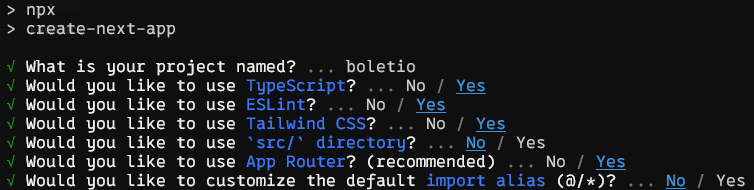
Then I was lazy again and used ChatGPT a bunch to create the application it self.
Step 2: Set Up Azure App Service
Next, I took the lazy option again and created an Azure App Service using the Azure Portal instead of creating a bicep template for it.
These was the configurations that I used:
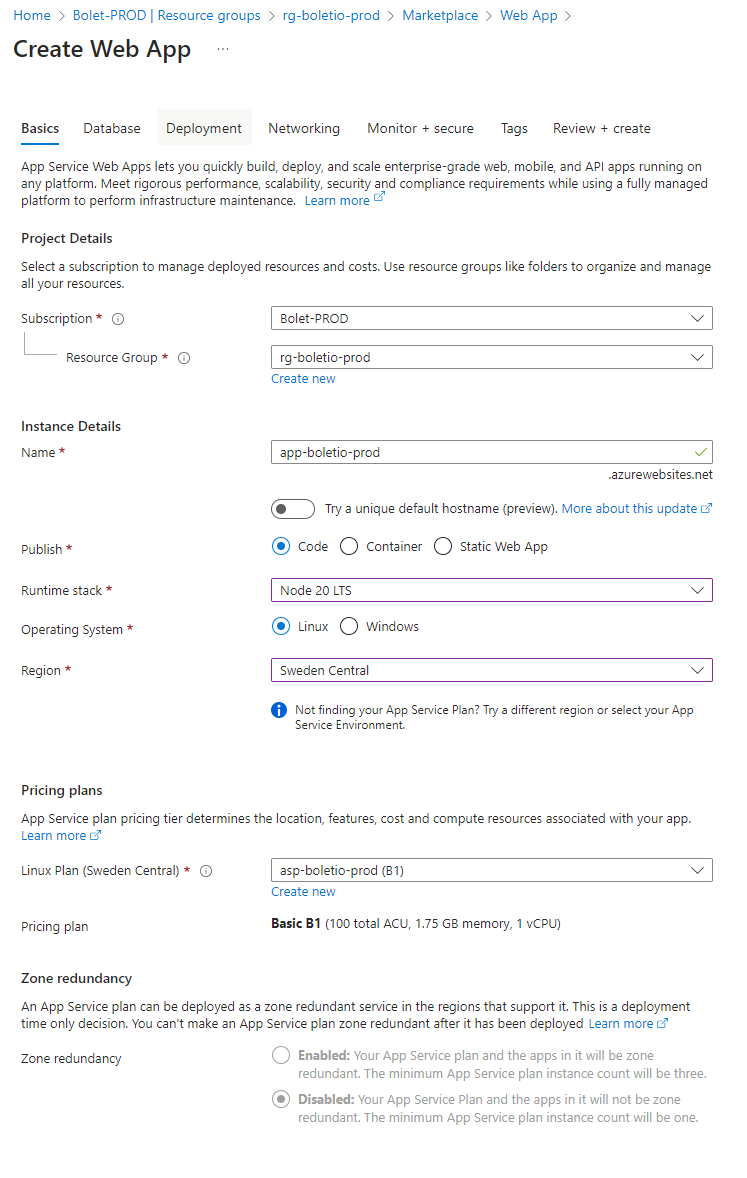
Then I used the build in option to automatically setup continuous deployment from GitHub. This will generate a YAML file that contains all the GitHub Actions to build and deploys the code to the Azure App Service. This process also automatically adds the client-id, tenant-id and subscription-id as secrets such that GitHub Actions needs to deploy code.
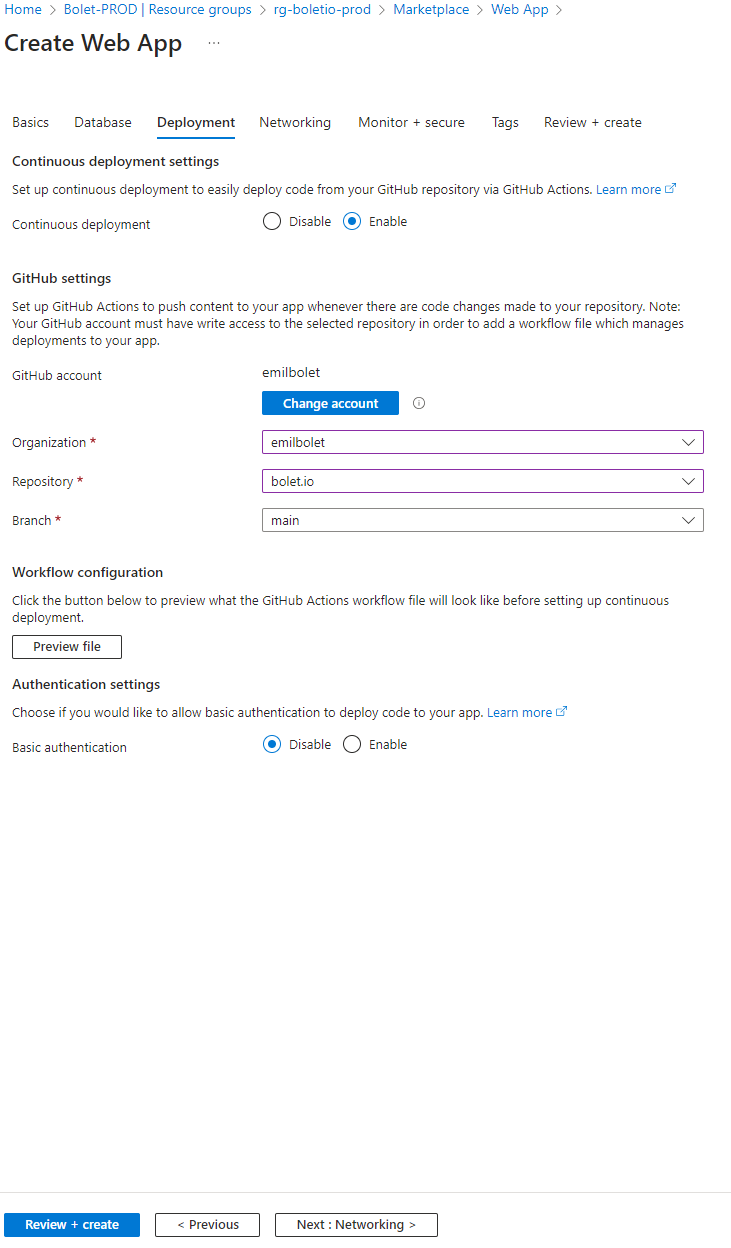
Step 3: GitHub Actions
This the GitHub Action YAML file that Azure generated
# Docs for the Azure Web Apps Deploy action: https://github.com/Azure/webapps-deploy
# More GitHub Actions for Azure: https://github.com/Azure/actions

name: Build and deploy Node.js app to Azure Web App - app-boletio-prod

on:
  push:
    branches:
      - main
  workflow_dispatch:

jobs:
  build:
    runs-on: ubuntu-latest

    steps:
      - uses: actions/checkout@v4

      - name: Set up Node.js version
        uses: actions/setup-node@v3
        with:
          node-version: '20.x'

      - name: npm install, build, and test
        run: |
          npm install
          npm run build --if-present
          npm run test --if-present

      - name: Zip artifact for deployment
        run: zip release.zip ./* -r

      - name: Upload artifact for deployment job
        uses: actions/upload-artifact@v4
        with:
          name: node-app
          path: release.zip

  deploy:
    runs-on: ubuntu-latest
    needs: build
    environment:
      name: 'Production'
      url: ${{ steps.deploy-to-webapp.outputs.webapp-url }}
    permissions:
      id-token: write #This is required for requesting the JWT

    steps:
      - name: Download artifact from build job
        uses: actions/download-artifact@v4
        with:
          name: node-app

      - name: Unzip artifact for deployment
        run: unzip release.zip

      - name: Login to Azure
        uses: azure/login@v2
        with:
          client-id: ${{ secrets.AZUREAPPSERVICE_CLIENTID_7D5A50CF708D480280E09F1B1BCE49AF }}
          tenant-id: ${{ secrets.AZUREAPPSERVICE_TENANTID_27309C20B33D4BBDB9F0471F8DD159F3 }}
          subscription-id: ${{ secrets.AZUREAPPSERVICE_SUBSCRIPTIONID_C438AEEA429340BB869882F6D65A7F00 }}

      - name: 'Deploy to Azure Web App'
        id: deploy-to-webapp
        uses: azure/webapps-deploy@v3
        with:
          app-name: 'app-boletio-prod'
          slot-name: 'Production'
          package: .
I didn't make any changes to the pipeline event though the process could be optimized a fair bit, but it looked like it would work (or so I thought... 😅).
Step 4: Getting the application to run
Until now the process of getting the application deployed to an Azure App Service was pretty straightforward but at this point I started running in to some minor problems.
First, I needed to add some startup configurations the both the App service and the application it self.
First I created a ecosystem.config.js to the root of my Next.js project.
module.exports = {
  apps: [
    {
      name: "boletio",
      script: "node_modules/next/dist/bin/next",
      args: "start",
      env: {
        PORT: process.env.PORT || 3000,
      },
      watch: false,
      autorestart: true,
    },
  ],
};
Then I added this pm2 --no-daemon start ecosystem.config.js as a Startup Command for the Azure App service
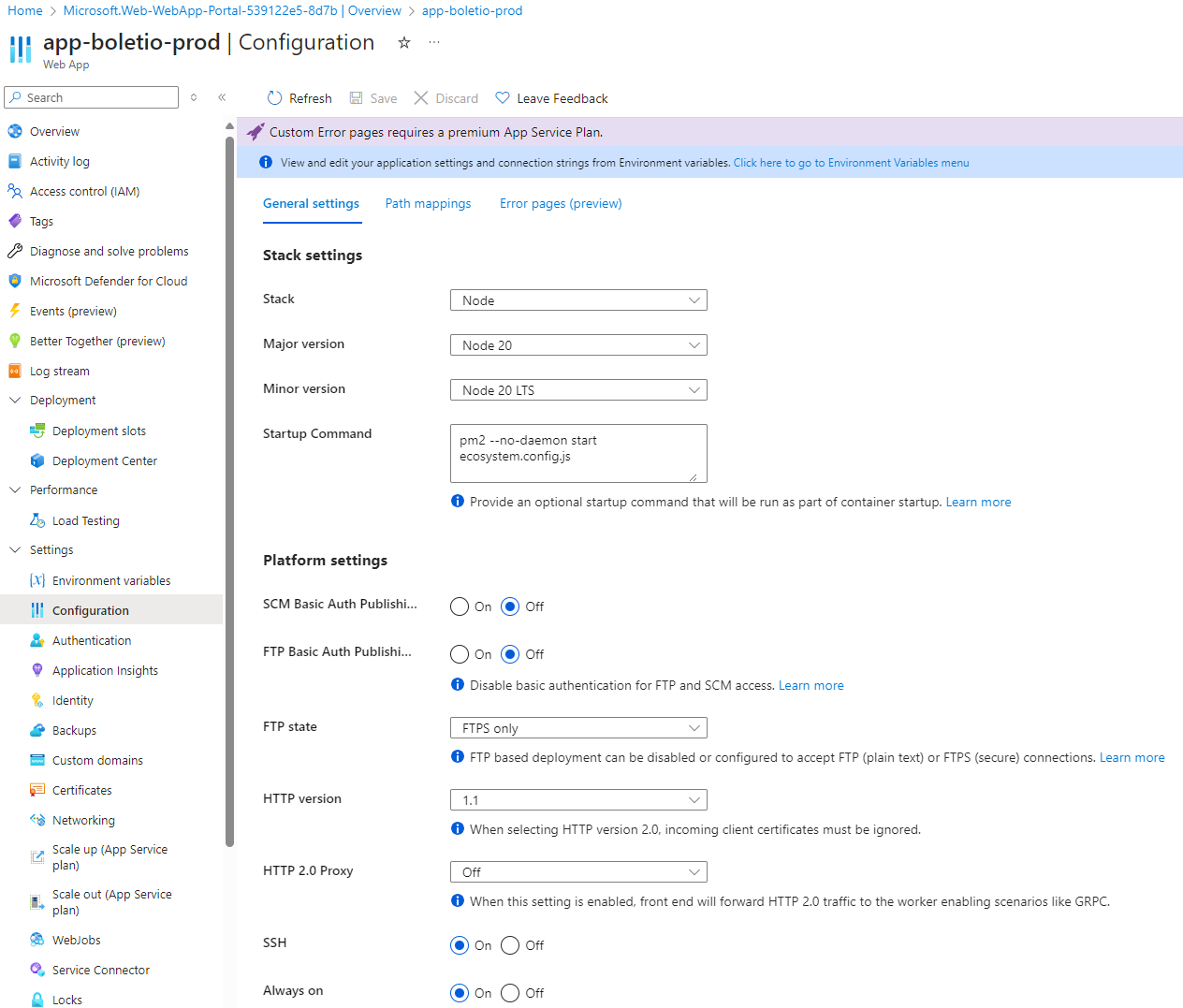 I also set the App Service to Always on to On while I was here
However the application wasn't able to start

I went to the Log steam to get an idea of what the error was.
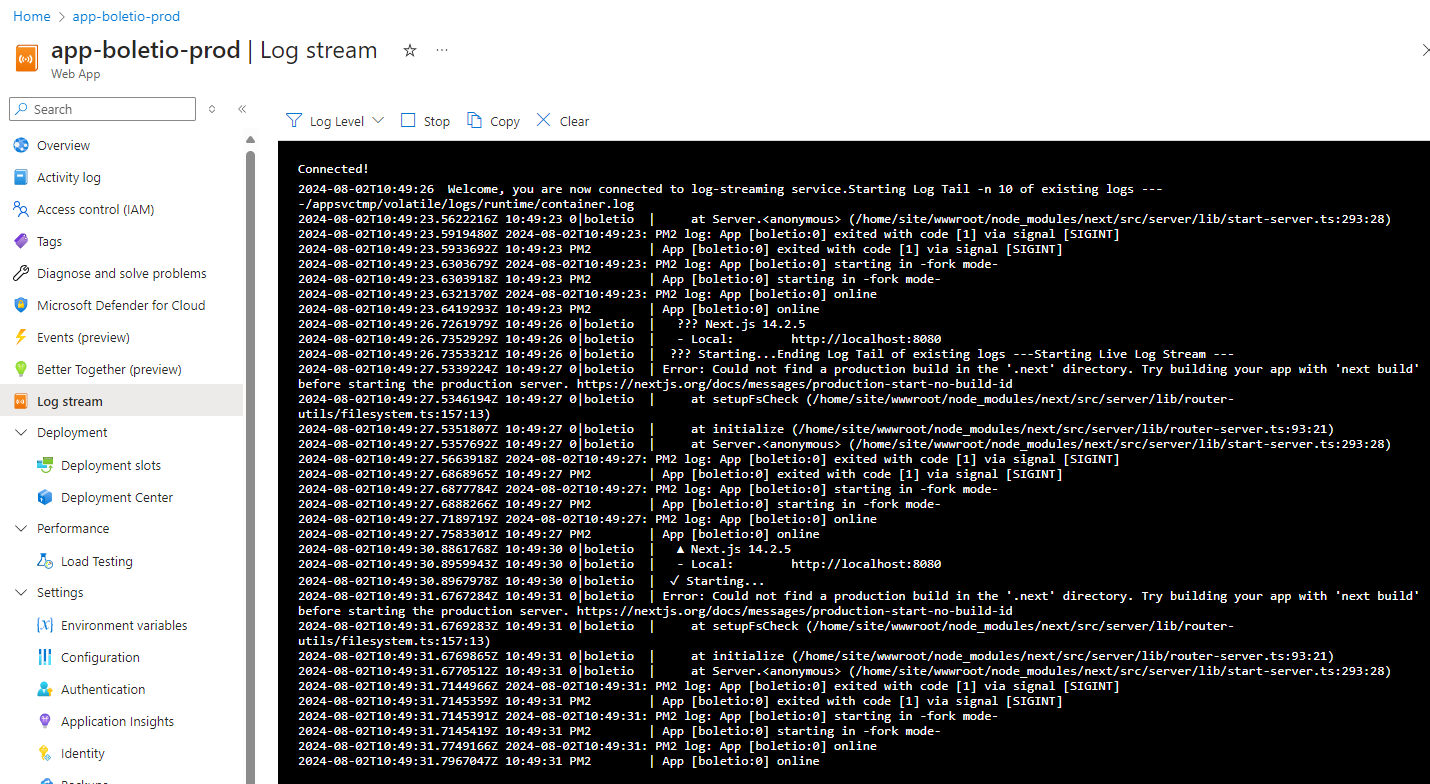
As seen in the log message Could not find a production build in the '.next' directory it looks like it couldn't find a build in the .next folder.
2024-08-02T10:49:51.2364108Z 10:49:51 0|boletio  |   ▲ Next.js 14.2.5
2024-08-02T10:49:51.2364108Z 10:49:51 0|boletio  |   - Local:        http://localhost:8080
2024-08-02T10:49:51.2374667Z 10:49:51 0|boletio  |  ✓ Starting...
2024-08-02T10:49:52.1090972Z 10:49:52 0|boletio  | Error: Could not find a production build in the '.next' directory. Try building your app with 'next build' before starting the production server. https://nextjs.org/docs/messages/production-start-no-build-id
2024-08-02T10:49:52.1262233Z 10:49:52 0|boletio  |     at setupFsCheck (/home/site/wwwroot/node_modules/next/src/server/lib/router-utils/filesystem.ts:157:13)
2024-08-02T10:49:52.1262488Z 10:49:52 0|boletio  |     at initialize (/home/site/wwwroot/node_modules/next/src/server/lib/router-server.ts:93:21)
2024-08-02T10:49:52.1262519Z 10:49:52 0|boletio  |     at Server.<anonymous> (/home/site/wwwroot/node_modules/next/src/server/lib/start-server.ts:293:28)
2024-08-02T10:49:52.1477259Z 2024-08-02T10:49:52: PM2 log: App [boletio:0] exited with code [1] via signal [SIGINT]
2024-08-02T10:49:52.1562441Z 10:49:52 PM2        | App [boletio:0] exited with code [1] via signal [SIGINT]
2024-08-02T10:49:52.1575668Z 2024-08-02T10:49:52: PM2 log: App [boletio:0] starting in -fork mode-
2024-08-02T10:49:52.1586106Z 10:49:52 PM2        | App [boletio:0] starting in -fork mode-
2024-08-02T10:49:52.1887666Z 2024-08-02T10:49:52: PM2 log: App [boletio:0] online
2024-08-02T10:49:52.1974425Z 10:49:52 PM2        | App [boletio:0] online
I went ahead and changed the GitHub Actions workflow to include the missing files. I change this action:
      - name: Zip artifact for deployment
        run: zip release.zip ./* -r
To this:
      - name: Zip artifact for deployment
        run: zip -r release.zip .next static package.json posts
That not only made the build and deploy process much faster but also made it possible for the Next.js app to start. HURRAH🥳🎉
Written by Emil Bolet · Cloud Operations Manager · More about me →
0 responses
Keep reading
My Essential Azure Toolkit – Tools and Websites I Keep Coming Back To
A personal list of the most useful Azure tools and websites I rely on for performance testing, infrastructure as code, storage management, policy exploration, and full-stack development.
Azure App Configuration - The Hidden Gem in Your Cloud Toolbox
Discover why Azure App Configuration is one of the most underrated tools in Azure, how it compares to Azure Key Vault, and how to deploy it using Bicep and Azure CLI.
How to Build and Deploy an Angular 18 App to Azure App Service (The Easy Way!)
Learn how to easily build, optimize, and deploy an Angular 18 app to Azure App Service using Azure CLI, GitHub Actions, or Azure DevOps for seamless, scalable hosting.
One thoughtful article, every month.
No fluff, no recaps. Just deep technical writing, delivered to your inbox.